

Business cyber security checklist for Australia
Protect your business email and website with two-factor authentication (2FA), prompt security updates, limited access and tested backups. Keep only the customer information you need. Before the holiday rush, give someone responsibility for each check and write down who to call if your website, inbox or payment process is compromised.
Put the advice into practice
Turn scattered marketing into a considered plan
Connect strategy, creative, channels and ongoing review around your sales process.
Explore our marketing services
Discuss an ongoing marketing partnershipThis business cyber security checklist turns current Australian government advice into checks you can work through with your team or IT provider.
Over the past couple of weeks, we’ve been working around the clock to support as many businesses as possible after website hacks, including some hosted elsewhere. We could help some, but missing access meant we could not resolve every case. We will always do our best to help local businesses with no-cost or low-cost options where we can. Please keep account access available to the right people, maintain your software and test your backups.
What does Australia’s latest cyber threat report say?
The Australian Signals Directorate’s Australian Cyber Security Centre published its Annual Cyber Threat Report 2025–26 on 26 October 2026. It recorded more than 82,000 cybercrime reports to ReportCyber during that financial year, roughly one every six minutes.
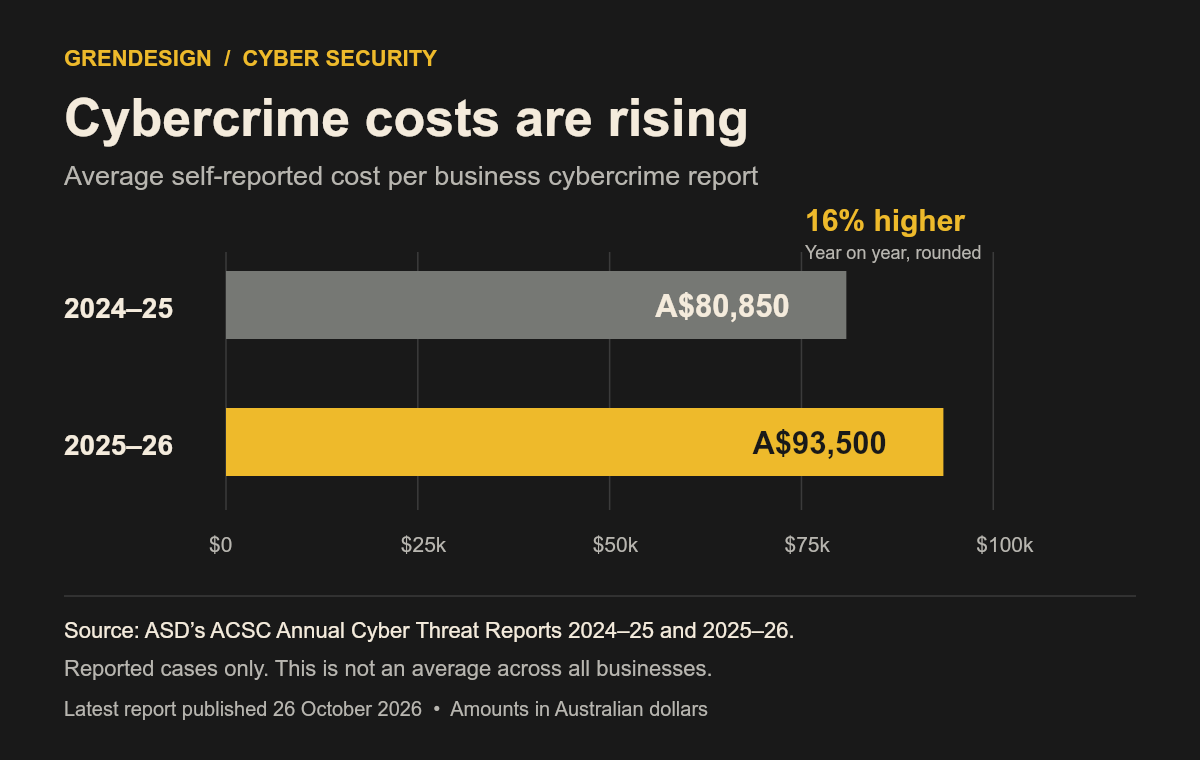
The average self-reported cost for businesses was $93,500 per cybercrime report. That figure describes reported cases; it is not an average cost across every Australian business. See the report’s year in review and data notes.
For comparison, the 2024–25 business fact sheet recorded an average of A$80,850 per report. The latest figure is about 16% higher. Both figures are self-reported costs, so they describe reported cases rather than every business.
As the report puts it: “Everyone is responsible for cyber security.”
Are local businesses being targeted too?
Yes. Businesses with smaller teams face cyber threats too. The government’s October 2026 report update says AI is amplifying the scale, speed and sophistication of malicious activity. Keeping a low profile is not a security measure; protect the accounts and information your work depends on.
Large organisations can be breached as well. On 4 November 2026, 7NEWS reported a breach affecting a NSW Health oral health website. Officials said patient information had not been compromised. The investigation was ongoing when this article was prepared. An organisation’s size does not establish that every system is protected.
Which accounts should you secure first?
Start with business email, then website administration, hosting, your domain provider and payment systems. Turn on two-factor authentication (2FA) wherever it is available. It adds a second check beyond your password and is a type of multi-factor authentication (MFA). Prefer phishing-resistant options such as passkeys or security keys where supported. Keep recovery codes securely, and use a password manager for unique passwords.
Give each person their own account. Remove access when someone leaves and limit administrator permissions to people who need them. Store recovery details somewhere the right people can reach during an outage. Follow the ACSC’s account security guidance.
How do you protect a WordPress website?
Keep WordPress, themes and plugins supported and updated. Take a current backup before changes, then check the site still works. Treat urgent security fixes as urgent; a routine maintenance date should not delay them.
Ask your provider who applies updates, watches for suspicious activity and responds to alerts. Confirm your domain renewal details and use HTTPS. The ACSC’s website security advice covers these responsibilities. Hosting alone does not tell you which maintenance tasks someone has agreed to do.
How do you know your backup will work?
Ask for a restore test in a separate, safe environment. A successful backup notification does not prove you can recover a working website.
Confirm what is included, how often backups run, where they are stored and who can restore them. Include both website files and its database. Protect backups separately from the systems they cover, and include important email and cloud data in your recovery plan. Record when the last restore test succeeded. The ACSC’s backup planning guidance is a useful starting point.
What customer information should you keep?
Review what your forms collect and where submissions go: the website, inboxes, spreadsheets and connected apps. Limit collection and access to what the work requires. Set a retention policy that accounts for applicable record-keeping requirements.
Include AI tools in that review. Check which information a tool can access and how it handles it before sharing customer records. See the ACSC’s business and customer data guidance.
How should staff check suspicious payment requests?
Verify changed bank details, unusual payments and urgent requests through a known phone number. Use details you already trust, rather than the number in the message. A familiar sender name is not enough: criminals can impersonate a supplier or use a compromised inbox. The ACSC explains these business email threats.
Who should act if something goes wrong?
Keep a short contact list for your IT provider, website host, bank and whoever leads your response. Make it available outside your main email account. If money or financial information is compromised, contact your bank immediately. Report cybercrime through ReportCyber and follow the ACSC’s incident response guidance.
Finish one useful check today: name the person responsible for your next restore test and put a date beside it. For the customer-facing checks, use our holiday website checklist.